No products in the cart.



Description

Lascar SGD 70-A
- 7″ capacitive touch display
- Designed for use with PanelPilotACE Design Studio
- Free drag-and-drop style software package
Panel Meter
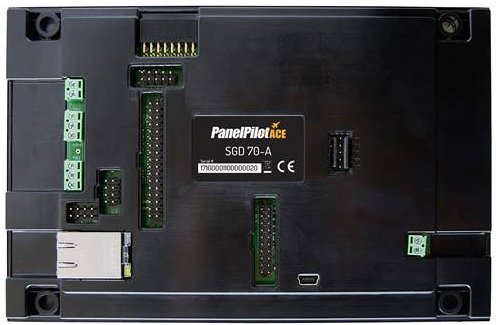
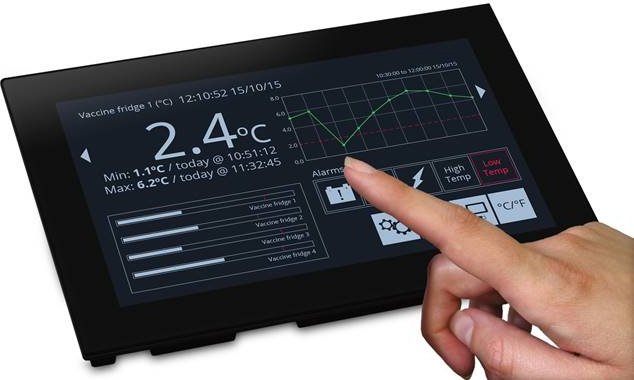
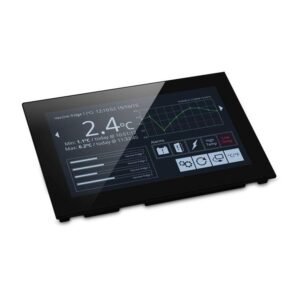
SGD 70-A is a 7″ capacitive touch display designed for use with PanelPilotACE Design Studio, a free drag-and-drop style software package for rapid development of advanced user interfaces and panel meters. This off the shelf display features a wealth of hardware interfaces, including four 16-bit bipolar analogue inputs (to a maximum of ±40V d.c.), eight digital input/output pins, two alarm outputs, four 8-bit PWM outputs, PID Control, Ethernet FTP for logged data, multi-channel data logging and trend graphs, serial RS232 and RS485 and an additional add on board to measure temperature.

Code-Free development for industrial display projects
The PanelPilotACE Design Studio software provides a number of building blocks which allow users to drag-and-drop elements onto the screen to quickly create advanced display interfaces. From images to text elements, analogue style meters, touch screen navigation elements, logic statements, data logging, trend graphing and calculations, users can build up multi-screen interfaces without needing to write a line of code.
There is a library of pre-defined elements such as meters, buttons and switches, and users can create their own content by combining elements or importing graphics in a number of formats (including jpg, png, tif, bmp and gif). The software includes support for transparency and multiple layers.
PID Control:
Use your display as a PID control unit. Set P, I and D coefficients, measure a process variable and use PanelPilotACE to correct to your desired set point.
Easy Collection of Logged Data:
Easily collect logged data by connecting the PanelPilotACE via USB to a PC running Design Studio or Device Utility Software, or connect to an FTP Server via wired Ethernet.
Multi-Channel Data Logging:
10 logging channels allowing logging of any input to the device that can be defined numerically.
Trend Graphs:
Display data on graphs as it is logged. If you use an alarm threshold as one of your data channels, monitor logged data against alarm levels.
Previewing and Uploading Projects:
The software includes a “Preview in Emulator” function which emulates the hardware’s inputs and outputs, allowing users to test their projects prior to upload. Projects are uploaded to the SGD 70-A via a mini USB port.
Dimensions
All dimensions are in mm (in)

Panel Cut-Out and Fitting

The panel cut-out is 180 x 117mm (7.1″ x 4.57″).
The module can be mounted in panels between 0.5 and 4.0mm (0.01” and 0.15”) in thickness.
To do this take the four bracket clips supplied and use the screws to secure these to the mounting holes located on the rear of the module.
Then place the module in the panel and tighten the grub screws located in each bracket to secure the module within the panel.
Product General Attributes | |
|---|---|
| Shipping Weight | 2.00 LBS |
You must be logged in to post a review.
Manuals/Guides
Related products
Sale

Simpson 01520 Panel Meters Analog Round Style DC Ammeters
Original price was: $151.45.$131.94Current price is: $131.94. Add to cartSale
Simpson 02575 Panel Meter UL WV 1257MD—0-3 ACA 2.5
Original price was: $143.91.$125.37Current price is: $125.37. Add to cartSale

Simpson 02619 0-150 ACA Current Meter
Original price was: $148.64.$129.50Current price is: $129.50. Add to cart

 Lascar SGD 70-A – Panel ...
 $568.13
Our team of knowledgeable professionals is here to help you make informed decisions. Whether you need product recommendations, technical support, or guidance on your purchase, we're just a click away.
Contact Us Now:
📧 sales@nestesinstruments.com
📞 +1 (833) 763-7837
Let us assist you in finding the perfect solution!
Contact Us Now:
📧 sales@nestesinstruments.com
📞 +1 (833) 763-7837
Let us assist you in finding the perfect solution!
Reviews
There are no reviews yet.