No products in the cart.





Description
Rohde and Schwarz CDS-LL – Campus Dashboard (Local License and Dongle)

- Campus Dashboard (Local license and dongle)
- Improve teaching routines in large student laboratories
- Control up to 300 individual measurement instruments from one workplace
- Train student efficiently on oscilloscopes, spectrum analyzers, network analyzers and power supplies
- Set identical conditions to all student benches
Teaching large student groups in test and measurement laboratories can be difficult to manage. Especially in laboratories with many workbenches and different instruments, it is cumbersome to provide identical conditions for all students. Retrieving results from all students’ instruments usually is a time-consuming task. At the same time, it is necessary to keep all instruments up-to-date with regular firmware updates.
With the R&S CDS software, these tasks can be performed for multiple instruments simultaneously. It enables simple and time-efficient teaching of large student groups in laboratories with multiple test and measurement benches.
Operated from one central computer, the software automatically connects to supported instruments in the local network. It makes it possible to arrange the instruments on virtual benches that can be customized to match the user’s laboratory layout. The software also enables simultaneous firmware updates on multiple instruments with just a few clicks.
The R&S CDS campus dashboard software remotely controls up to 300 individual instruments (oscilloscopes, spectrum analyzers, network analyzers and power supplies). With the software, the teacher sets identical conditions for all student benches, to save settings from one instrument and distribute these settings to all students, or to retrieve results of all students simultaneously. These operations require just a few clicks.
In addition, the teacher can remotely control the single instruments and execute various measurement functions using the software interface. This way, the software tremendously simplifies simultaneous lab training for student groups. It also streamlines regular maintenance of multiple instruments in laboratories with many workbenches by enabling simultaneous firmware updates on multiple instruments.
The R&S CDS software is an ideal solution for easily managing and controlling large student laboratories from a single computer. Lab managers, tutors, students and professors equally benefit from its excellent usability, simplified workflows and automation capabilities.
Key facts
- Improve teaching routines in large student laboratories
- Control up to 300 individual test and measurement instruments from one workplace
- Train student efficiently on oscilloscopes, spectrum analyzers, network analyzers and power supplies
- Set identical conditions for all student benches
- Save settings from one instrument and distribute to all students
- Retrieve results of all students simultaneously
- Control various instrument functions, settings, firmware updates, screenshots
Benefits and key features
Efficient laboratory teaching for student groups
- Set identical conditions for all student benches
- Save settings from one instrument and distribute to all students
- Retrieve results of all students simultaneously
- Customize virtual benches to match the laboratory layout
Loading settings to multiple instruments makes it possible to load identical lessons onto several instruments. Taking screenshots from multiple instruments and collecting them with just a few clicks after a test increases efficiency for teaching and testing large student groups.
Remote control of up to 300 individual instruments
- R&S RTC1000, R&S RTB2000, R&S RTM3000, R&S RTA4000 oscilloscopes
- R&S FSH, R&S FSC, R&S FPH, R&S FPC1000, R&S FPC1500 spectrum analyzers
- R&S ZVH, R&S ZPH network analyzers
- R&S NGE100, R&S NGE100B power supplies
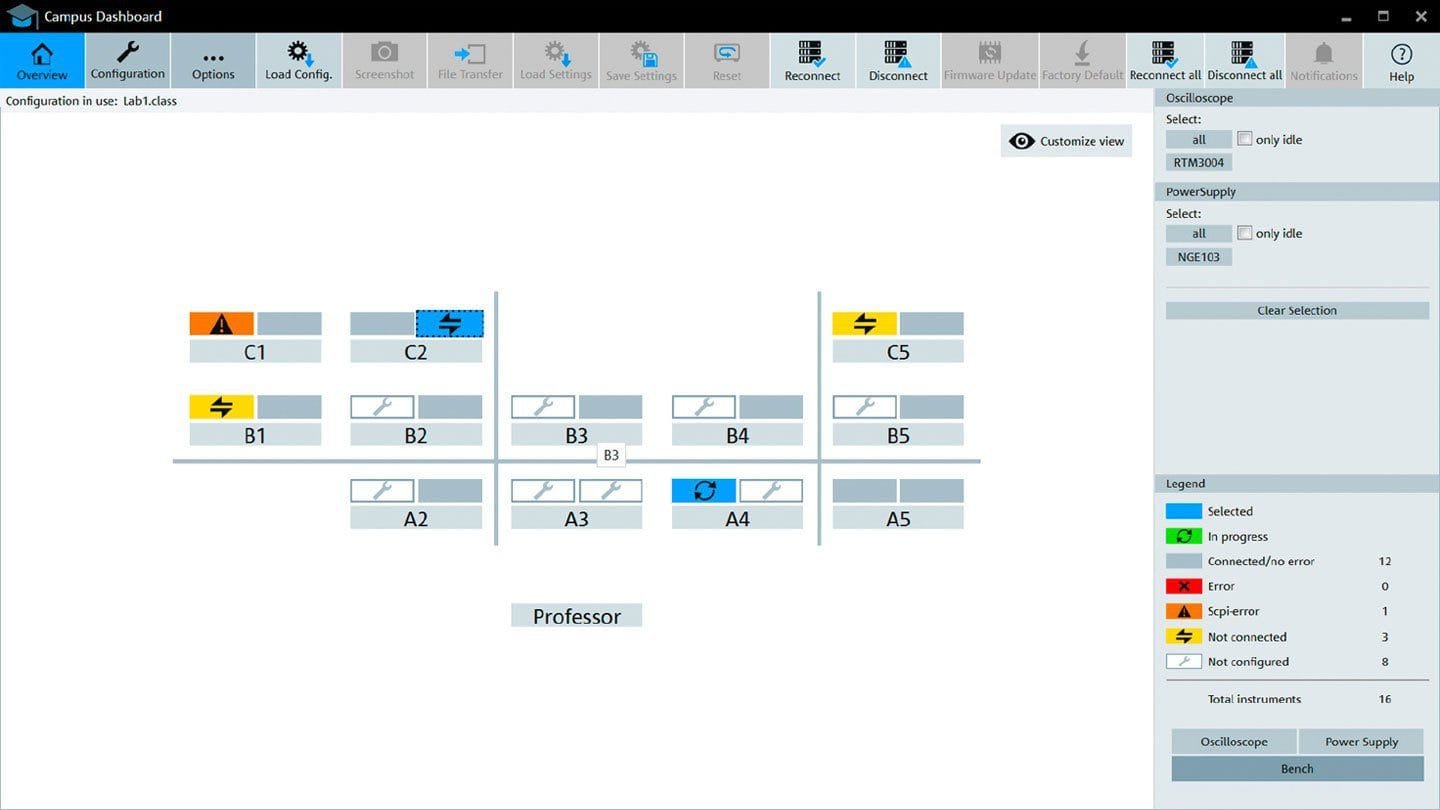
Grouping several instruments into multiple virtual benches gives a clear overview of the laboratory in the software interface, including the status of each individual instrument. An automated search detects all supported instruments in the local network. Alternatively, an .xml list of individual instruments can be loaded into the software. Custom bench layouts match the software with the actual lab arrangement.
Perform remote measurements
- Remote control of various instrument functions
- Direct access to hardkey functions and software features
- Graphical user interface for easy operation via live view
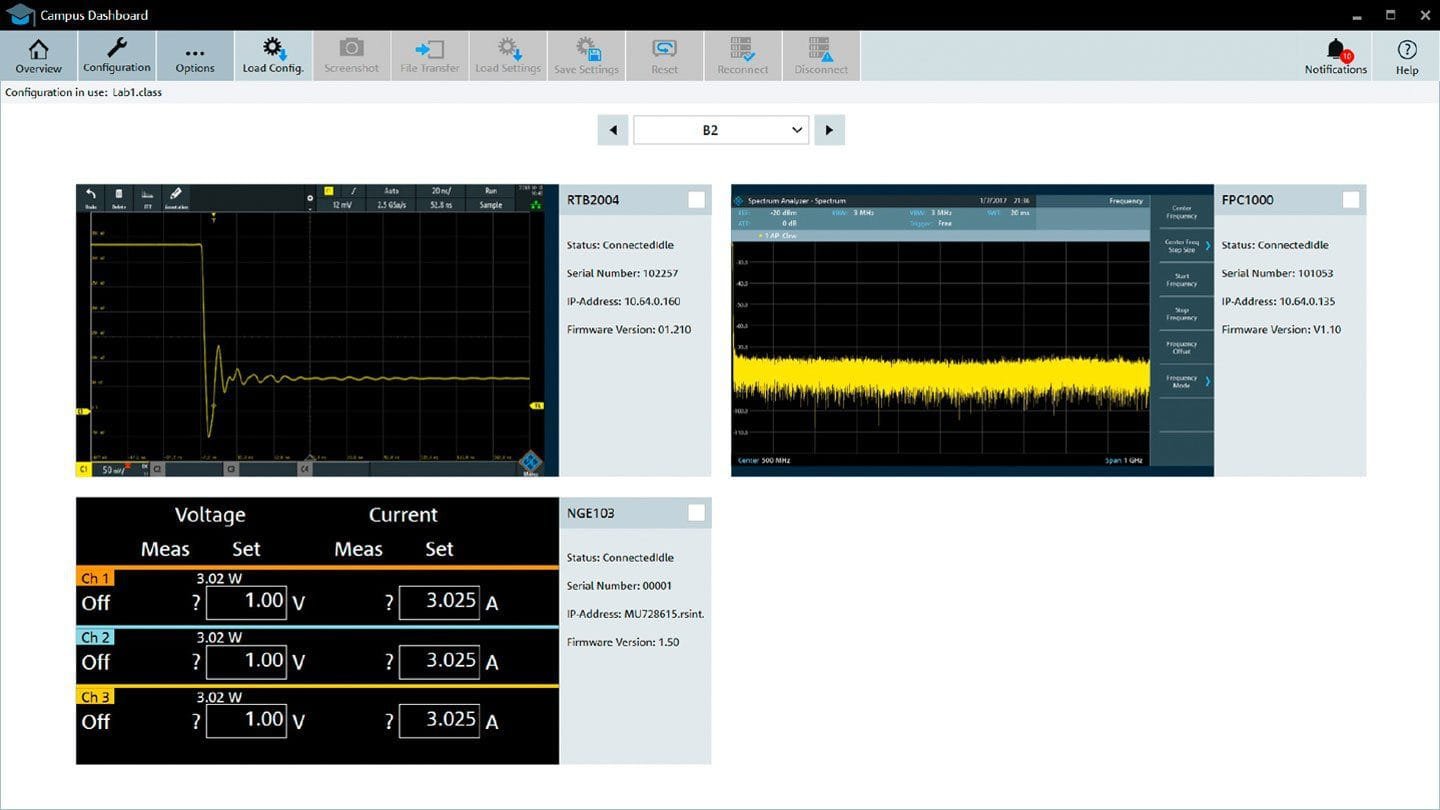
Measurement functions of each configured instrument can be executed using the R&S CDS campus dashboard software. With a GUI that matches the control layout of the selected instrument, the software can be intuitively operated. This simplifies measurement tasks and enables individual training of students.

The R&S CDS campus dashboard software enables simple and time-efficient teaching in multi-user student laboratories

Match software layout to your lab arrangement and organize individual benches with up to four instruments each

Search supported instruments in your local network; drag&drop instruments onto individual benches

View all instruments on one bench on your computer screen using the R&S CDS campus dashboard software; the software also supports remote control of each instrument
Load and retrieve settings and firmware updates
- Simultaneous configuration of multiple instruments of the same type
- Identical teaching procedures for student groups
- Simultaneous firmware updates of several instruments
The ability to configure several instruments at the same time is crucial to generating identical training conditions for student groups. In addition, updating multiple instruments simultaneously saves time and boosts efficiency to keep the lab environment up to date. The file transfer function makes it possible to store, download and delete files from the instruments.

Delete, upload and download files on each instrument remotely

Launch simultaneous firmware updates on several instruments with one click
Ordering information
Two license models are available for the R&S CDS campus dashboard software. Both require a hardware USB dongle for operation:
- The local license requires that the R&S CDS-LL USB dongle be connected to the computer that runs the R&S CDS campus dashboard software. In this case, the software can only be operated on this computer.
- The floating license requires that the R&S CDS-FL USB dongle be connected to a server in the local network. In this case, the license can be used on different computers, but only on one computer at a time.
| R&S CDS-LL | R&S CDS-FL | |
| Description | local license and dongle | floating license and dongle |
| Individual classroom layout | ✓ | ✓ |
| Load settings on multiple instruments | ✓ | ✓ |
| Retrieve results simultaneously | ✓ | ✓ |
| Usable on multiple computers | ✓ |
Product General Attributes | |
|---|---|
| Shipping Weight | 0.5 LBS |
| ECCN Number | FREI-INLAND |
| Country of Origin | Qatar |
Manuals/Guides
You must be logged in to post a review.
Manuals/Guides
| Weight | 0.5 lbs |
|---|
Related products

Sale

Televes 148281 – DAT BOSS MIX Antenna with PSU
Original price was: $186.94.$175.94Current price is: $175.94. Add to cartSale
TREND Networks 150061 – Replacement WiFi Antenna (Formerly IDEAL Networks)
Original price was: $71.50.$67.92Current price is: $67.92. Add to cart

 Rohde and Schwarz CDS-LL ̵...
 $125.00
Our team of knowledgeable professionals is here to help you make informed decisions. Whether you need product recommendations, technical support, or guidance on your purchase, we're just a click away.
Contact Us Now:
📧 sales@nestesinstruments.com
📞 +1 (833) 763-7837
Let us assist you in finding the perfect solution!
Contact Us Now:
📧 sales@nestesinstruments.com
📞 +1 (833) 763-7837
Let us assist you in finding the perfect solution!
Reviews
There are no reviews yet.