No products in the cart.

Sale

Description
TREND Networks R164061 – Cable and Adapter Kit LC MM 50/125µm
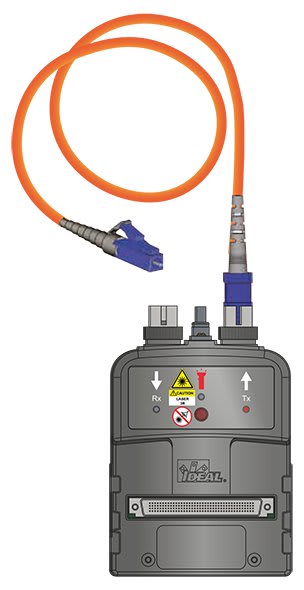
The multimode R164061 and single-mode R164062 accessory kits allow one-jumper calibration when testing cabling systems with LC connectors. The kits utilize a precision LC adapter for the receive (Rx) port of each FiberTEK III module and a SC-LC test cord for the transmit (Tx) port. One-jumper calibration recommended by most standards for field testing. Procedure is the same for MM and SM testing.

One-jumper Calibration
- Choose desired test standard in LanTEK.
- Collect 2 x LC-SC and 2 x LC-LC test cords. Clean and inspect each connector.
- Attach LC end to Rx port and SC end to Tx port of each module.
- Select Field Calibration from home screen.
- Press 1 Jumper (F2) calibration mode.
- Press Start (F1) icon to begin.

Bi-directional Test Step 1
- Disconnect test cord from Rx port of each module. Do not disturb connector at Tx port.
- Attach an LC-LC test cord to the Rx port of each module.
- Connect test cords to cable under test after cleaning the connectors of cable under test.
- Run Autotest.
Measured loss includes the connection at the end of the test cords, the cord on the Rx port and the cable under test.

Bi-directional Test Step 2
- Reverse the test cord connections at both ends of the cable under test.
- Do not remove the connections to the FiberTEK III adapters, this will void the calibration.
- Press Continue (F1) to resume the test. The results for both fibers in each direction will be displayed at test completion.
- R164053 – Cable kit SC/PC MM 50/125µm
- R164054 – Cable kit FC/PC MM 50/125µm
- R164055 – Cable kit ST/PC MM 50/125µm
- R164056 – LC 50/125µm cables and couplers
- R164057 – Cable kit SC/PC SM 9/125µm
- R164058 – Cable kit FC/PC SM 9/125µm
- R164059 – LC 9/125µm cables and couplers
- R164061 – Cable and adapter kit LC MM 50/125µm
- R164062 – Cable and adapter kit LC SM 9/125µm
- R164064 – LC Rx adapter for MM and SM, each
Fiber Optic Testing Cables | |
|---|---|
| Fiber Type | Multi mode |
| Fiber Optic Cable Diameter | 50 |
| Fiber Optic Connector Type End 1 | LC |
| Fiber Optic Connector Type End 2 | LC |
Product General Attributes | |
| Country of Origin | China |
You must be logged in to post a review.
Manuals/Guides
Related products
Sale

Fluke Networks MT-8200-60-KIT IntelliTone Pro 200 LAN Kit
Original price was: $361.88.$330.55Current price is: $330.55. Add to cartSale

TREND Networks 150054 – Advanced Wire Map Remote (Formerly IDEAL Networks)
Original price was: $60.50.$57.47Current price is: $57.47. Add to cartSale

Fluke Networks CIQ-WM CABLEIQ Wiremap Adapter
Original price was: $179.28.$151.62Current price is: $151.62. Add to cartSale

Fluke Networks MS-POE – MicroScanner PoE Cable Verifier
Original price was: $1,018.58.$857.87Current price is: $857.87. Add to cartSale

Fluke Networks DSX2-8000QI 2 GHz DSX2-8000 Cable Analyzer with Quad OLTS, Fiber Inspection and Wi-Fi
Original price was: $29,900.18.$27,149.93Current price is: $27,149.93. Add to cart TREND Networks R164061 –...
 Original price was: $693.00.$658.35Current price is: $658.35.
Our team of knowledgeable professionals is here to help you make informed decisions. Whether you need product recommendations, technical support, or guidance on your purchase, we're just a click away.
Contact Us Now:
📧 sales@nestesinstruments.com
📞 +1 (833) 763-7837
Let us assist you in finding the perfect solution!
Contact Us Now:
📧 sales@nestesinstruments.com
📞 +1 (833) 763-7837
Let us assist you in finding the perfect solution!
Reviews
There are no reviews yet.