No products in the cart.

Sale

Description

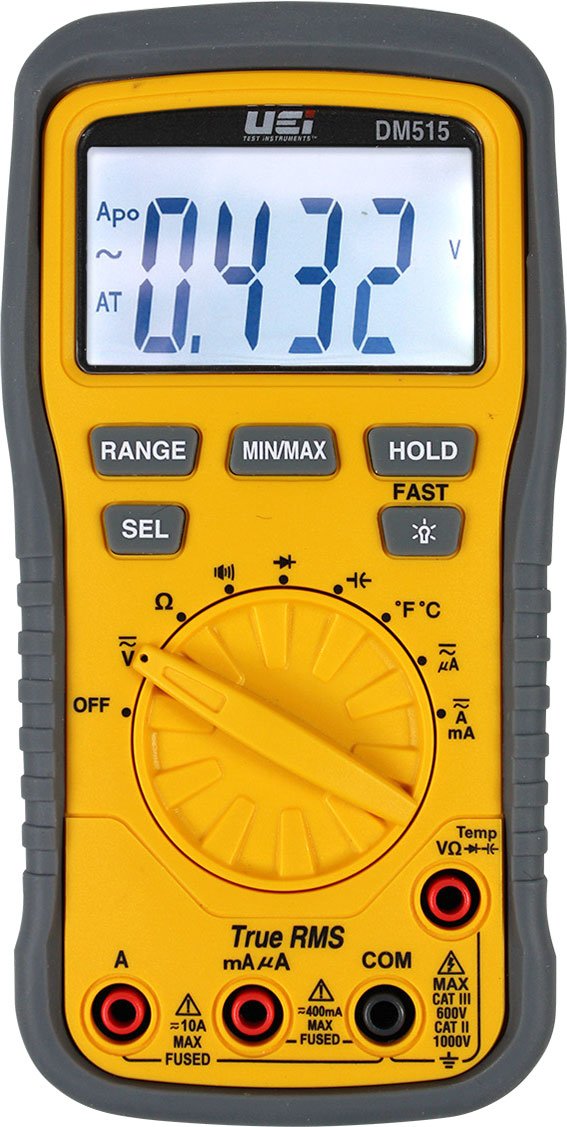
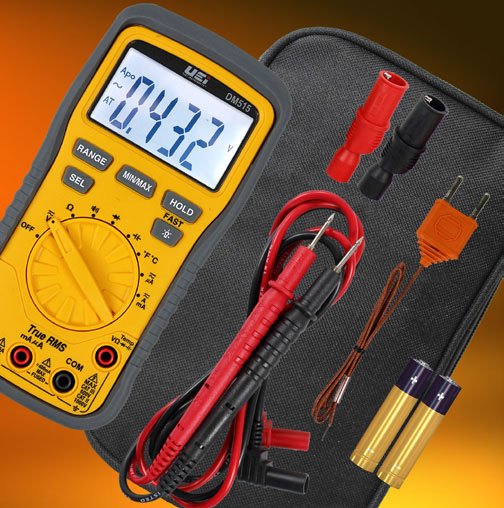
Uei DM515
- Multimeter TRMS, TEMP, CAP
- Auto-ranging
- Auto power off
- Min/Max
- Fused test lead inputs
- 2-Year limited warranty
TRMS 1000V HVACR Multimeter with Temperature
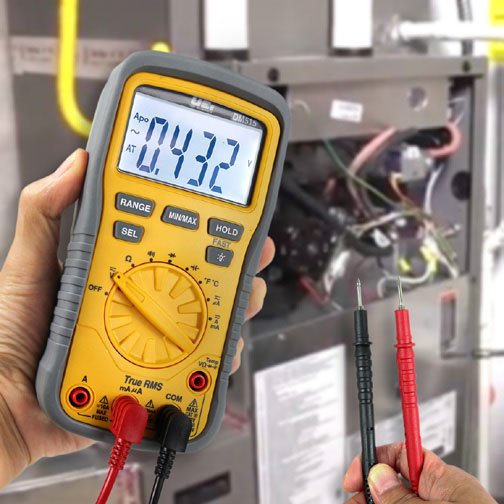
The UEi DM515 TRMS 1000V Multimeter with Temperature is designed for trade professionals who are familiar with the hazards of their trade. Observe all recommended safety procedures that include proper lockout utilization and use of personal protective equipment that includes safety glasses, gloves and flame resistant clothing.
Higher voltages and currents require greater awareness of physical safety hazards. Before connecting the test leads; turn off power to the circuit under test, set meter to the desired function and range; connect the test leads to the meter first, then connect to the circuit under test. Reapply power. If an erroneous reading is observed, disconnect power immediately and recheck all settings and connections.
Heading
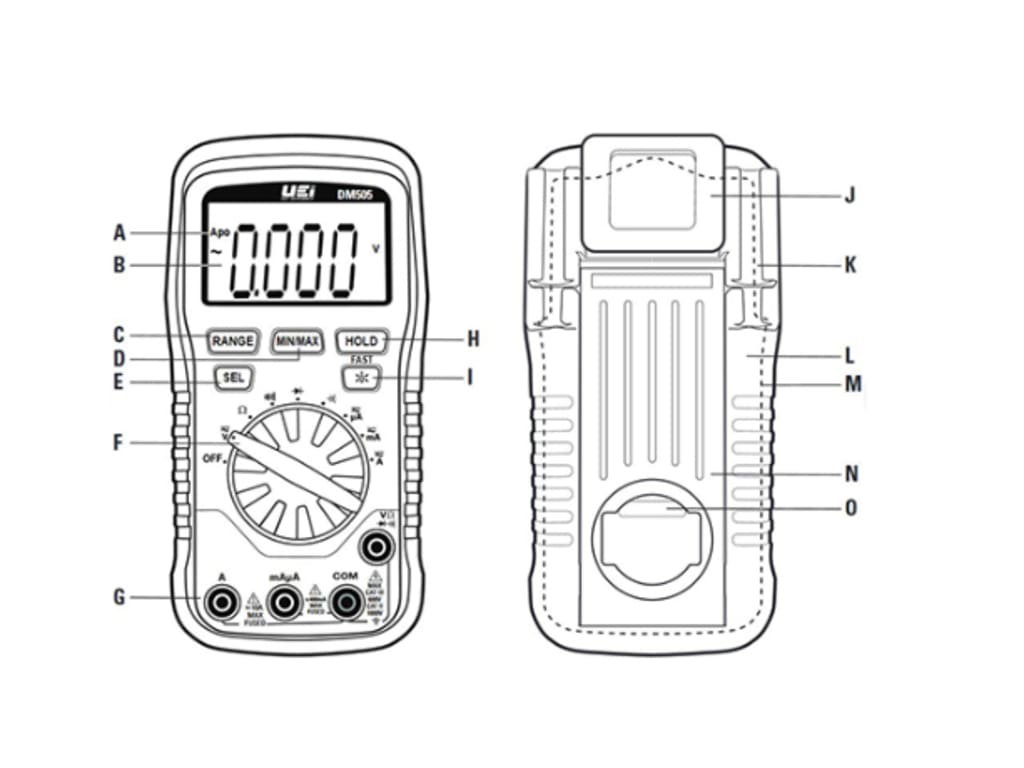
A. Apo: Auto power off after 30 minutes of use. Press and hold the HOLD button while turning the meter on to disable Apo.
B. Digital Backlit Display
C. Range Button:
- Press to change from auto ranging to manual ranging.
- Press repeatedly to select proper range.
- Press and hold to return to auto range (AT will be displayed on screen).
D. Min/Max Button:
- Press to enter MAX/MIN mode.
- In the V, μA, mA or Amps functions, either select AC/DC or change to manual ranging before pressing this button to enter MAX/MIN mode.
- Press repeatedly to alternate between Maximum and Minimum readings.
- Press and hold to return to live readings
Select Button: Press to select AC,DC or Auto Selection in the following functions: Voltage, μA, mA, Amps.
- Press to select AC, DC or Auto Selection in the following functions: Voltage, μA, mA, Amps.
- Press to select °C or °F in the Temperature function.
Function Dial: Turns on meter and is used to select the function.
Hold/Fast Button:
- Press to hold the reading on the display. Press again to return to live reading.
- Press to enter Fast MAX/MIN mode in MAX/MIN mode.
- Press again to return to normal MAX/MIN mode.
Category Max Indicator: Maximum CAT Rating for fused input jacks.
- Multifunction input port used for measuring: AC or DC volts, resistance, continuity, diode, capacitance μA,.mA, Amps, Temperature.
- Use CATIII test leads or higher.
J. Recess for magnetic hanger
K. Test Lead Holders
L. Protective Rubber Boot
M. Battery Cover (under protective rubber boot)
N. Kick Stand
O. Serial Number (under kick stand)
Multimeters Template | |
|---|---|
| Style | Hand-Held |
| Measures AC V | Yes |
| Measures DC V | Yes |
| Measures AC A | Yes |
| Measures DC A | Yes |
| True RMS | No |
| Maximum Voltage AC | 1000 V |
| Resolution AC Volts | 0.1 mV |
| Maximum Voltage DC | 1000 V |
| Resolution DC Volts | 0.1 mV |
| Maximum Current AC | 10 A |
| Minimum Current AC | 400 mA |
| Resolution AC Current | 0.1 mA |
| Maximum Current DC | 10 A |
| Minimum Current DC | 400 mA |
| Resolution DC Current | 0.1 mA |
| Basic Accuracy V DC | +/-0.5% |
| # Digit Display | 5 |
| Counts | 6000 . |
| Backlight | Yes |
| Manual/Autoranging | Both |
| Resistance | Yes |
| Capacitance | Yes |
| Temperature | Yes |
| Diode Testing | Yes |
| CAT Rating | III |
| CAT Voltage | 600 V |
| Peak Hold | Yes |
| Overload Protector | Yes |
| Data Hold | Yes |
You must be logged in to post a review.
Manuals/Guides
Related products
Sale

TPI 183A True RMS Digital Multi-Meter with Temperature Capacitance
Original price was: $164.94.$151.74Current price is: $151.74. Add to cartSale

TPI 196 – High Resolution Process Control Digital Multimeter
Original price was: $263.94.$242.82Current price is: $242.82. Add to cartSale
B&K Precision 2704C – Manual Ranging Tool Kit DMM with Transistor Test
Original price was: $86.90.$69.83Current price is: $69.83. Add to cart

 UEi DM515 – TRMS 1000V H...
 Original price was: $173.19.$147.21Current price is: $147.21.
Our team of knowledgeable professionals is here to help you make informed decisions. Whether you need product recommendations, technical support, or guidance on your purchase, we're just a click away.
Contact Us Now:
📧 sales@nestesinstruments.com
📞 +1 (833) 763-7837
Let us assist you in finding the perfect solution!
Contact Us Now:
📧 sales@nestesinstruments.com
📞 +1 (833) 763-7837
Let us assist you in finding the perfect solution!
Reviews
There are no reviews yet.