No products in the cart.

Description
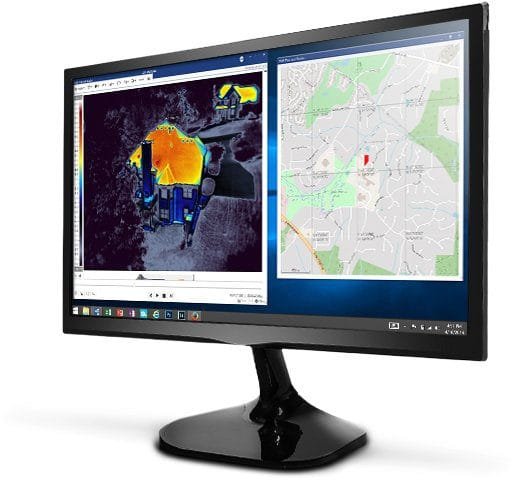
FLIR T300083 – Thermal Studio Software – Perpetual License

Thermal Studio Software
- Automate Data Collection and Reporting
- Streamline Image Editing
- Enhance Thermal Videos
The FLIR T300083 Thermal Studio Pro will help you manage thousands of thermal images and videos, whether they’re from a handheld camera, unmanned aircraft system (UAS), or optical gas imaging (OGI) camera. This software offers the advanced processing features you need to survey critical components quickly, troubleshoot systems, and increase productivity. Use the optional FLIR Route Creator plug-in to streamline your workflow by creating an inspection path you can download directly to any FLIR T-Series camera with Inspection Route enabled. These routes will help you acquire data and thermal images in a logical sequence and maintain historical records for improved predictive maintenance. Available in more than 20 languages, FLIR Thermal Studio Pro offers simplified image processing so you can spend more time in the field than at your desk.
Automate Data Collection and Reporting
Solutions for inspection routing and rapid reporting make your workday easier
- Create routes you can download to an enabled FLIR T-Series camera for streamlined inspections of critical assets
- Produce consistent, professional-looking report templates with customer-focused content—without the need for Microsoft Office
- Generate reports quickly—more than 100 pages in less than a minute—based on customizable templates


Streamline Image Editing
Batch processing accelerates post-production and report generation
- Manage, edit, analyze, and report on thousands of thermal images gathered during surveys faster
- Easily adjust Multi Spectral Dynamic Imaging (MSX) and other visual light camera features
- Pre-define a set of actions and apply those to any number of images or videos
- Select a thermal image and apply its properties across all images
Enhance Thermal Videos
Processing and usability advancements help users store, access, move, and edit large thermal video files
- Edit, identify, and select radiometric video segments that capture gas leaks in motion
- Select video segments and export in standard formats
- Use high-sensitivity mode and pixel binning in post-production to identify gas leaks that are difficult to see on video while in the field

You must be logged in to post a review.
Manuals/Guides
Related products
Sale

Televes 148281 – DAT BOSS MIX Antenna with PSU
Original price was: $186.94.$175.94Current price is: $175.94. Add to cart
Sale

Televes 149783 – DAT BOSS LR Antenna (UHF / DTT)
Original price was: $175.94.$164.94Current price is: $164.94. Add to cartSale
Televes 149884 – DAT BOSS LR Mix U/V-Hi Antenna
Original price was: $208.94.$197.94Current price is: $197.94. Add to cart
 FLIR T300083 – Thermal S...
Our team of knowledgeable professionals is here to help you make informed decisions. Whether you need product recommendations, technical support, or guidance on your purchase, we're just a click away.
Contact Us Now:
📧 sales@nestesinstruments.com
📞 +1 (833) 763-7837
Let us assist you in finding the perfect solution!
Contact Us Now:
📧 sales@nestesinstruments.com
📞 +1 (833) 763-7837
Let us assist you in finding the perfect solution!
Reviews
There are no reviews yet.