No products in the cart.

Sale




Description
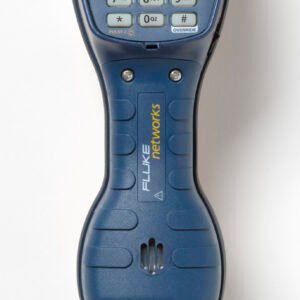
Fluke Networks 52801TNT TS52 PRO Test Set with 4MM Banana and X-LG Alligator and Test Probe

Available with various line cord connectors to suit specific applications
Detects dial tone and polarity, places and receives calls, indicates line voltage and current, verifies caller ID service, and has a speakerphone for hands-free conversation during testing of telephone lines.
High-visibility glow-in-the-dark keypad with standard dialing keys and function keys, plus a backlit LCD for tracking functions and test status
Meets IEC safety standard 61010-1:2010 and is rated for CAT I installations to 300VDC, passes a 20′ drop test, and resists rain and moisture.
TS52 PRO Test Set
Fluke Networks’ new TS®52 PRO Test Set features the latest in test set technology. Designed with a superior, radiant liquid crystal display (LCD) user interface, it allows you to see what cannot be heard in any outside plant environment.
The back lit LCD and phosphorescent (glow-in-the-dark) keypad brings light to even the darkest of work environments, providing perfect line diagnostic clarity.
The TS®52 PRO Test Set is also equipped with 2-WaySpeakerphone and DataSafe™ Pro data protection technology featuring superior high-impedance monitoring, Data Lockout and Lockout Override, making you completely safe.
Handy features
This easy-to-use unit comes with all the features that make a technician more productive, including a crystal clear LCD (liquid crystal display) with backlight, caller-id, a high-fidelity, two-way hands-free amplified speakerphone, speed dialing, a low battery warning indicator and a rugged oversized locking belt clip for universal needs.
Data protection for your network:
- DataSafe (Extended range high-impedance)
- Data lockout with single button override
Testing benefits that increase your productivity:
- Caller-ID
- DTMF Digit Grabbing
- Data indication/warning
- Voltage indication
- Current (mA) indication
- Visual ANAC Mode (Automatic Number Announcement Circuit)
Durability and design that exceeds your needs:
- LCD (Liquid Crystal Display) with backlight
- DropSafe 20 feet
- Enhanced weatherproof/ waterproof case design
- Line cord strain relief
- Low profile keypad with protection ridge
- Mountable, top or bottom, extra large metal locking belt clip
Display: Easy-to-read Visual Indicator Icons
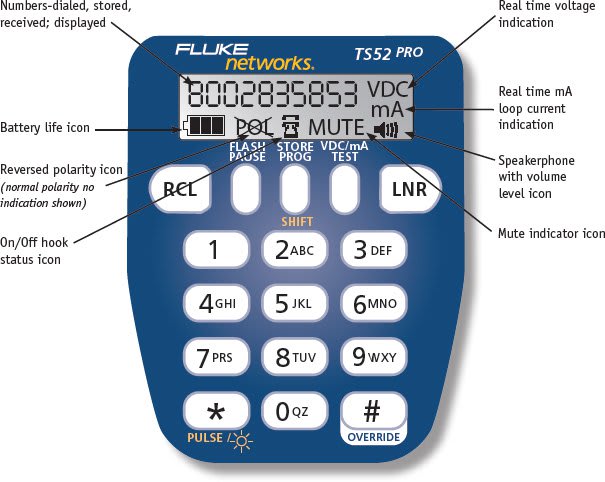
| TS52 PRO Test Set Quick Guide | |
| Feature | Operation |
| Data Test/ Lockout Override | Connect the unit to Tip and Ring and move the T/M switch to T. If high speed data is present, a warning beep sounds, the test set will lockout, will not go off-hook, and the display shows LOCKOUT. If there is no high speed data, the unit will go off-hook. If the test set is locked out and you are certain that you want to go off-hook, press the OVERRIDE key. |
| Line Voltage Test | In Monitor mode, press the Vdc/mA TEST key. |
| Loop Current Test | Switch to Talk mode and press the Vdc/mA TEST key. |
| Redial the Last Number Dialed | Switch to Talk mode and press the LNR key. |
| Pulse Dialing | By default the unit is configured to Tone dial. Any time the test set goes off-hook, it is automatically set to tone dialing. If you want to Pulse dial, switch to Talk mode and once off-hook, press the SHIFT (STORE PROG) key and then the PULSE key to change the dialing mode to pulse dialing. You can then enter the number to call. |
| Program Speed Dial Numbers | Switch to Monitor mode and press RCL. Enter the number to be stored. Press STORE/PROG, then press the number of the memory location (0-9) where you want to store it. The test set gives a confirmation tone and the display shows STORED. Dialing a number from Speed Dial location 9 automatically puts the test set into Visual ANAC mode and the test set is muted. |
| Set Receive-Only Loud Speaker as Default(for use in noisy environments) | Switch to Monitor mode and press STORE/PROG, then press MUTE. The confirmation tone sounds. To restore the Speakerphone as the default Speaker mode, repeat the above steps. |
| Speed Dial a Stored Number | Switch to Talk mode and press RCL. Press the key (0-9) of the memory location where the number is stored. The display shows the number being called. |
| Two-Way Speakerphone | Switch to Talk mode and press SPKR. Press SPKR again to deactivate. If you are listening only, press MUTE to activate the Receive-Only Loud Speaker. Press MUTE again to restore the two-way Speakerphone. |
| Turn on visual ANAC mode (For service provider use only, visual ANAC not available in all regions) | You can get a visual ANAC DTMF response by putting the test set in visual ANAC mode. Use speed dial location 9 or switch to Talk mode, press the STORE/PROG key and then the # key. When you dial your ANAC number, the number that you are dialing from is shown on the display and the test set is muted. |
| Display and Backlight | Turn on the display by switching to Talk mode or press the VOL or Vdc/mA TEST key in Monitor mode. Turn on or off the backlight in Monitor mode by pressing STORE/PROG followed by *. The default is off, this conserves battery power. |
| DTMF Digit Grabbing | Switch to Monitor mode, press the STORE/PROG key and then the Vdc/mA TEST key. Digit grabbing is deactivated when the display times out. |
| Caller ID | The display shows the Caller ID (CID) after the first ring while in Monitor mode. The CID messages are:
|
| Polarity | If normal, no icon is displayed. If reversed, the icon is shown. |
Product General Attributes | |
|---|---|
| Product Height | 4.00 IN |
| Product Length | 12.00 IN |
| Product Width | 4.00 IN |
| Country of Origin | China |
| Shipping Height | 4.00 IN |
| Shipping Length | 12.00 IN |
| Shipping Width | 4.00 IN |
You must be logged in to post a review.
Manuals/Guides
| Dimensions | 12 × 4 × 4 in |
|---|
Related products
Sale

Fluke Networks DSX2-8000 2 GHz DSX Cable Analyzer V2, with Wi-Fi
Original price was: $16,838.78.$15,289.93Current price is: $15,289.93. Add to cartSale

Fluke Networks MS2-100 MicroScanner2 Cable Verifier
Original price was: $818.38.$689.27Current price is: $689.27. Add to cartSale

Armada Pro48K – Multi-Function Irrigation System Test Kit
Original price was: $214.50.$172.98Current price is: $172.98. Add to cartSale

Fluke Networks MS-POE – MicroScanner PoE Cable Verifier
Original price was: $1,018.58.$857.87Current price is: $857.87. Add to cartSale

Fluke Networks DSX-CHA004S DSX CAT 6A/CLASS EA CHA SET
Original price was: $689.68.$629.95Current price is: $629.95. Add to cart Fluke Networks 52801TNT TS52 P...
 Original price was: $740.99.$676.82Current price is: $676.82.
Our team of knowledgeable professionals is here to help you make informed decisions. Whether you need product recommendations, technical support, or guidance on your purchase, we're just a click away.
Contact Us Now:
📧 sales@nestesinstruments.com
📞 +1 (833) 763-7837
Let us assist you in finding the perfect solution!
Contact Us Now:
📧 sales@nestesinstruments.com
📞 +1 (833) 763-7837
Let us assist you in finding the perfect solution!
Reviews
There are no reviews yet.